









Interviews
25 Virtual Interview Tips to Look Professional on Camera in 2026
Use these virtual interview tips to improve your camera setup, lighting, audio, body language, and confidence before your next video interview.
Interview Pilot Editorial Team
11 min read

Virtual interviews are now a standard part of hiring, and the candidates who do best usually do one thing well: they make the technology invisible. The goal is not to look perfect. It is to look clear, calm, and prepared so the interviewer can focus on your answers, not your setup.
Here is the quick version: test your camera, use good front lighting, choose a simple background, fix your audio, dress like you would for an in-person interview, and practice answering while looking at the lens. If you do those five things well, you will already avoid many common virtual interview mistakes.
Quick answer: what matters most on camera
If you only have an hour before your interview, focus on these priorities first:
- Make sure your internet, camera, and microphone work.
- Sit facing a light source, not with a window behind you.
- Put your camera at eye level.
- Remove distractions from the background.
- Keep your notes nearby, but not so close that you keep reading them.
- Speak a little slower than normal and pause before answering.
- Smile, nod, and keep your posture open.
These basics cover most video interview tips that actually change how you come across.
Why virtual interview etiquette matters
In a video interview, small signals have a bigger impact. The interviewer cannot fully read your body language the way they can in person, so they notice the details that remain: eye contact, voice clarity, facial expressions, lighting, and whether you seem comfortable using the platform.
Good camera interview etiquette tells the interviewer that you are organized, respectful of their time, and able to communicate clearly in a remote environment. That matters whether you are interviewing for a hybrid role, an entry-level role, or a client-facing position.
1. Test your setup before the interview day
Do a full rehearsal, not just a quick login test. Open the same platform you will use for the interview and check:
- Camera quality
- Microphone quality
- Speaker volume
- Screen sharing permissions
- Browser compatibility
- Login credentials
If you use a laptop, close unnecessary tabs and apps. Notifications, pop-ups, and battery warnings are avoidable distractions.
A good rule: if you would not trust it in a meeting with a hiring manager, do not trust it in an interview.
2. Use a stable internet connection
A frozen screen or broken audio can ruin the rhythm of an otherwise strong interview. If possible, use wired internet or stay close to your router. If you must rely on Wi-Fi, minimize other traffic in the house during the interview.
If your connection is unstable, have a backup ready:
- Your phone hotspot
- The interviewer’s contact email
- A quiet place with stronger signal
If the connection fails, send a calm message quickly. Simple and professional is best:
I’m sorry, my connection dropped. I’m reconnecting now and should be back in the meeting shortly.
3. Put the camera at eye level
One of the most common virtual interview mistakes is a laptop camera aimed too low. That angle can make you look distracted or physically closed off.
Raise your laptop with books or a stand so the camera is at eye level. If you use an external webcam, position it directly in front of your face. This creates a more natural line of sight and improves posture automatically.
4. Light your face from the front
Lighting changes everything. The simplest setup is to face a window or soft lamp so light falls on your face. Do not sit with a bright window behind you, or your face may appear dark and hard to read.
A useful setup looks like this:
| Lighting setup | Result | Best use |
|---|---|---|
| Window in front of you | Bright, natural look | Daytime interviews |
| Lamp slightly behind camera | Even, flattering light | Evening interviews |
| Window behind you | Silhouette effect | Avoid this |
If you only have one lamp, place it just behind or beside your camera, not directly above your head.
5. Keep the background simple
Your background should support your message, not compete with it. A plain wall, tidy shelf, or clean office corner works well. Avoid clutter, moving people, visible laundry, strong patterns, and anything that may draw attention away from your face.
If you use a virtual background, keep it subtle. Some platforms blur backgrounds well, but blurred edges can still look distracting if your lighting is poor. A real, tidy space is often the safer choice.
6. Check what the interviewer sees behind you
Stand in front of your camera before the interview and look at the frame. Many candidates only test the image from their seat, then discover the camera captures a pile of boxes, a wall outlet, or a noisy hallway.
Do a quick visual audit:
- Are there mirrors or reflective surfaces?
- Can anyone walk behind you?
- Is your chair positioned in a quiet spot?
- Does the frame show only what you want it to show?
7. Dress fully, not just from the waist up
Yes, the camera may only show your top half, but dressing fully helps your mindset. Wear interview-appropriate clothing that fits well and does not create visual noise on camera.
Best practice:
- Solid colors usually read better than busy patterns
- Avoid shiny fabrics that reflect light
- Choose neat grooming over flashy accessories
- Make sure collars, sleeves, and hair stay tidy on camera
If you want a deeper prep plan, see the broader advice in our interview guides.
8. Look at the camera when you make important points
Many candidates naturally look at the interviewer’s face on screen, which can create the impression that they are looking slightly downward. That is normal. But when you want to emphasize a point, look into the camera lens for a few seconds.
This creates better perceived eye contact. You do not need to stare at the lens the entire time. Use a natural rhythm:
- Look at the interviewer while listening
- Look at the camera for key sentences
- Glance down briefly when collecting your thoughts
9. Keep your notes minimal and skimmable
Notes can help, but overusing them makes you sound scripted. Put only the essentials in front of you:
- Job title and company name
- 3–5 key accomplishments
- 2–3 questions to ask
- A few numbers or examples you want to mention
Write notes in short phrases, not long paragraphs. If you have to read, the interviewer will notice immediately.
A better approach is to practice so your notes become reminders, not scripts.
10. Practice answering out loud
Virtual interviews reward clarity. Reading silently in your head is not enough. Practice saying your answers out loud while watching yourself on camera. This helps you notice if you:
- Speak too fast
- End sentences too quietly
- Fill pauses with “um” or “like”
- Look away too often
Record a practice answer and review it once. You will usually spot one or two easy fixes right away.
11. Use the right audio setup
Bad audio is more damaging than slightly imperfect video. If your built-in microphone sounds hollow or distant, use earbuds with a mic or a simple external microphone.
Before the interview, test for:
- Echo
- Fan noise
- Street noise
- Keyboard clicks
- Notification sounds
Mute yourself when you are not speaking in group interviews. That is basic virtual interview etiquette and makes you seem polished.
12. Close background noise sources
Even quiet rooms can have distracting sound. Turn off:
- Fans
- Music
- TV
- Dishwashers or washing machines
- Phone alerts
Tell anyone nearby that you need uninterrupted time. If you live with others, place a note on the door.
13. Sit with an open posture
Your posture should suggest confidence and interest. Sit upright, keep both feet grounded, and avoid collapsing into the chair. Leaning slightly forward can help you look engaged, but do not crowd the camera.
Try not to:
- Cross your arms tightly
- Slouch
- Spin in a chair
- Tap a pen or desk
- Rest your chin on your hand for long periods
14. Use natural facial expressions
Because the camera flattens body language, your face matters more than usual. A warm expression at the start and during transitions helps you seem approachable.
You do not need to smile constantly. In fact, that can look unnatural. Aim for a calm, attentive expression that changes with the conversation.
15. Slow down your speaking pace
Many people talk faster on video without noticing. Slightly slow your pace and leave space between thoughts. That gives the interviewer time to process your answer and reduces the chance of talking over them.
A simple rhythm works well:
- Brief sentence that answers the question
- One example
- One result
- Short pause
This is especially useful for behavioral questions and STAR-based answers.
16. Handle pauses without panicking
In person, a pause can feel normal. On camera, it can feel louder than it is. Do not rush to fill every second.
If you need a moment, say:
- That is a great question. Let me think for a second.
- I want to answer that clearly.
- I’m thinking of the strongest example.
These phrases buy time and make you sound thoughtful, not unprepared.
17. Keep water nearby
Have a glass of water within reach. Virtual interviews can dry out your mouth faster than you expect, especially if you are nervous. Taking a brief sip also gives you a natural reset between answers.
Just avoid noisy bottles or long breaks that interrupt the flow.
18. Remove visual distractions from your desk
Your desk is part of your online interview setup. Keep only what you need in front of you:
- Water
- Notepad
- Pen
- Interview notes
Everything else should be out of frame. A clean surface makes you appear more organized and less rushed.
19. Control your notifications
Turn off phone alerts, desktop notifications, calendar pop-ups, and email banners. A single distraction can make it look like you are juggling the interview with other tasks.
Set your phone to Do Not Disturb and leave it face down or out of reach.
20. Join early, but not awkwardly early
Log in five to ten minutes early so you can troubleshoot without pressure. That gives you time to adjust the camera, check audio, and breathe before the interviewer arrives.
Do not join too early if the meeting room is not ready. The point is to be prepared, not to create a waiting-room problem.
21. Use a backup device if needed
If your laptop has a weak camera or unreliable battery, prepare a backup device before the interview. Make sure your account is signed in and permissions are ready.
A backup plan can save the day if your primary device suddenly fails.
22. Keep your hands visible and controlled
Hand gestures can make you sound more animated, but they should stay within frame and be measured. Small, open gestures work better than constant motion.
If you talk with your hands naturally, position the camera so your gestures do not disappear below the frame.
23. Treat the first 30 seconds like the whole interview
The first impression on camera forms fast. When the interview starts:
- Smile
- Greet the interviewer by name if appropriate
- Wait a beat before answering
- Speak clearly and at a moderate pace
You want to sound ready, not surprised.
24. Practice a one-minute camera introduction
Prepare a short introduction you can deliver smoothly:
Thanks for meeting with me today. I’m excited to learn more about the role and share how my experience in project coordination and client communication could support your team.
This kind of opening helps you start strong and settle in quickly.
25. Do a final five-minute preflight check
Before you click join, run this final checklist:
- Camera is centered and at eye level
- Lighting is even
- Background is clean
- Audio is tested
- Phone is on Do Not Disturb
- Water is nearby
- Notes are visible but minimal
- Clothing and grooming are ready
- Browser tabs are closed
- Meeting link is correct
If you want help with your answers as well as your setup, Interview Pilot’s AI interview assistant can listen to the call and show structured talking points on screen while you respond.
Common virtual interview mistakes to avoid
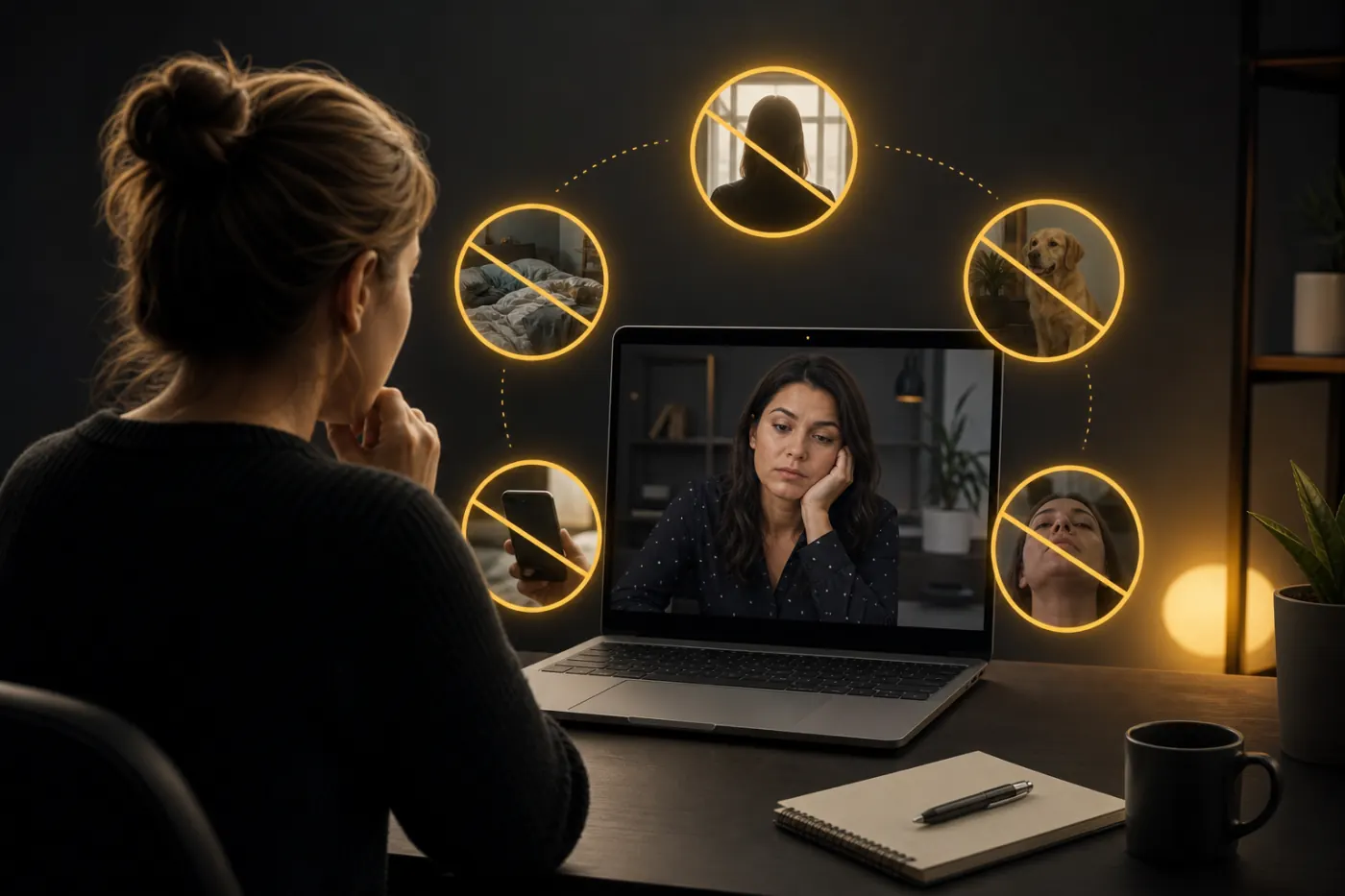 Here are the biggest avoidable errors candidates make:
| Mistake | Why it hurts | Better fix |
|---|---|---|
| Looking down at the screen the whole time | Reduces perceived eye contact | Look into the camera for key points |
| Backlighting from a window | Makes your face hard to see | Face the light source |
| Cluttered background | Distracts the interviewer | Use a simple, clean background |
| Echo or poor audio | Makes answers harder to follow | Test mic and use earbuds if needed |
| Reading from long notes | Sounds scripted | Use bullet prompts only |
| Talking too fast | Makes answers less clear | Slow down and pause |
| Notification pop-ups | Looks unprepared | Turn on Do Not Disturb |
Final thoughts
Virtual interviews are easier to manage when you think like the interviewer: they want to see whether you can communicate clearly, stay composed, and handle remote tools without friction. Most virtual interview tips come down to reducing noise, improving visibility, and practicing a calm delivery.
If you fix your camera angle, lighting, background, audio, and pacing, you will already be ahead of many candidates. That leaves the interview to do what it should: evaluate your skills, not your setup.
For more help preparing your answers and interview strategy, explore our interview guides and use Interview Pilot’s interview copilot to sharpen your response practice before the next call.
Topics
interviews
candidate-playbook
video interview tips
online interview setup
virtual interview mistakes
Continue reading
Interviews
How to Prepare for a Video Interview: Checklist and Tips
Use this video interview checklist to set up your camera, lighting, audio, and test run so you can start calm and look prepared.
July 5, 2026
8 min read
Interviews
What to Say in a Video Interview: 20 Common Questions and Best Answers (2026)
Learn what to say in a video interview with 20 common questions, sample answers, and on-camera tips for Zoom and virtual interviews.
July 1, 2026
11 min read
Interviews
What to Say When You Don't Know the Answer in a Technical Interview
Use this exact framework, sample scripts, and examples to answer technical interview questions when you do not know the answer.
August 23, 2026
10 min read