









Interviews
10 Interview Question on Linux Topics to Master
Prepare for an interview question on Linux with 10 essential topics, commands, examples, and troubleshooting scenarios for technical roles.
Interview Pilot Editorial Team
Updated September 19, 2026
23 min read
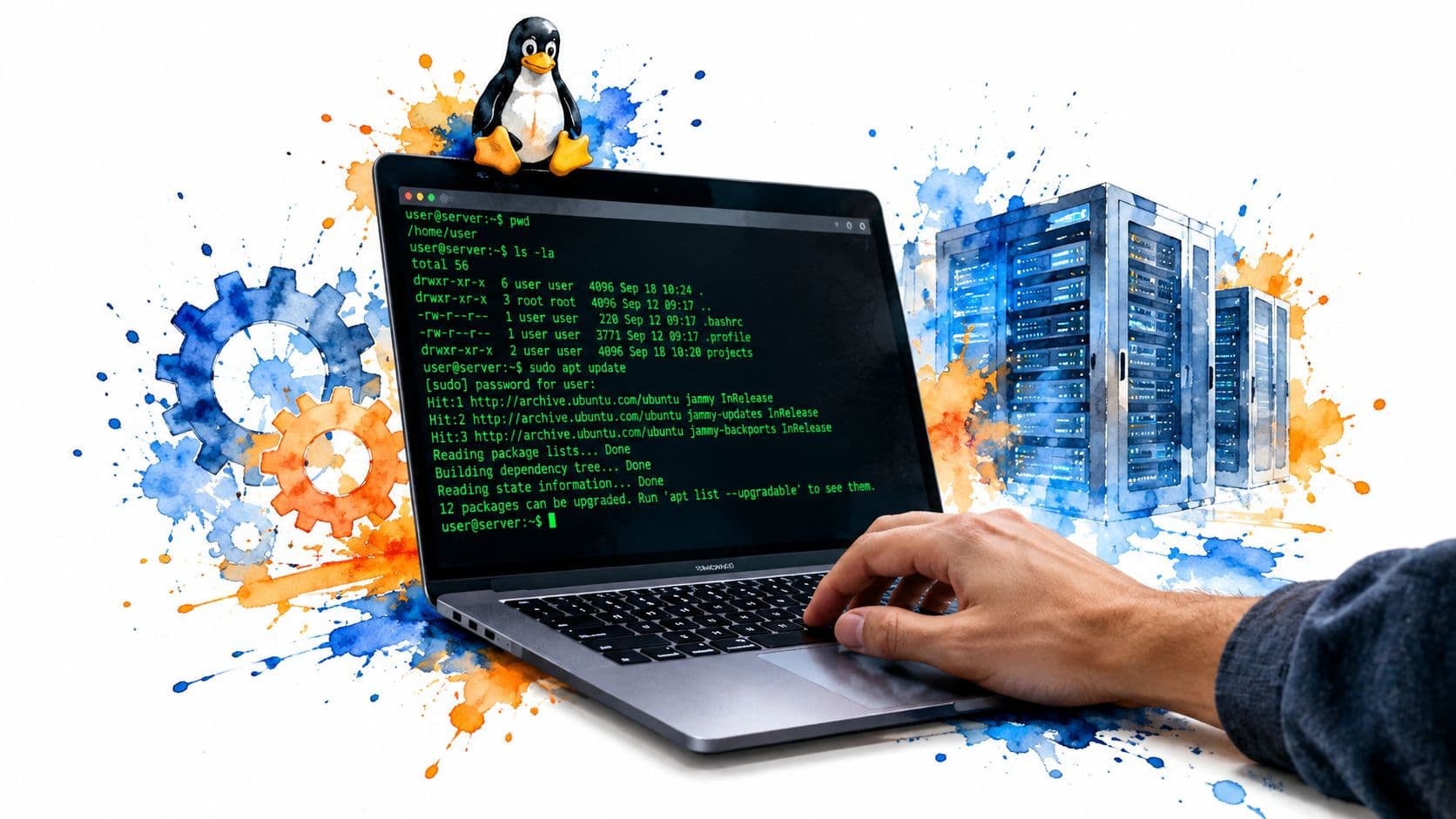
You're in the kind of interview where the first Linux question sounds simple. “What's the kernel?” Then the interviewer pivots. A service won't start. SSH connects, but the box is slow. A port is busy. Now your answer has to do more than define a term. It has to show that you can reason from symptoms to commands to a safe next step.
That's why a strong answer to an interview question on Linux usually has four parts. Define the concept. Show one command or example. Name a trade-off or common mistake. Then say how you'd verify it on a real system. If you practice in that pattern, your answers sound calmer and more credible under pressure.
Linux is foundational in interviews because the Linux kernel was first released by Linus Torvalds in 1991, and Linux later grew into a broad family of Unix-like systems through distributions such as Ubuntu, Debian, Fedora, and Red Hat Enterprise Linux. Interviewers often expect you to distinguish the kernel from the full distribution, because the kernel manages hardware, memory, processes, and the file system, while the distribution adds userland tools and system software, as explained in this Linux interview overview.
The ten questions below move in the same order many interviews do. You'll start with architecture, then processes, memory, files, permissions, signals, shell I/O, services, networking, and finally containers. If you also want a broader prep routine around technical rounds, pair this with a study plan for coding interviews.
1. What Is the Linux Kernel and How Does It Work?
The best short answer is: the kernel is the core of Linux. It sits between hardware and user applications, and it manages processes, memory, devices, and file systems. If an interviewer asks for more, add that the shell is not the kernel. The shell is a user-space program that lets you interact with the system.
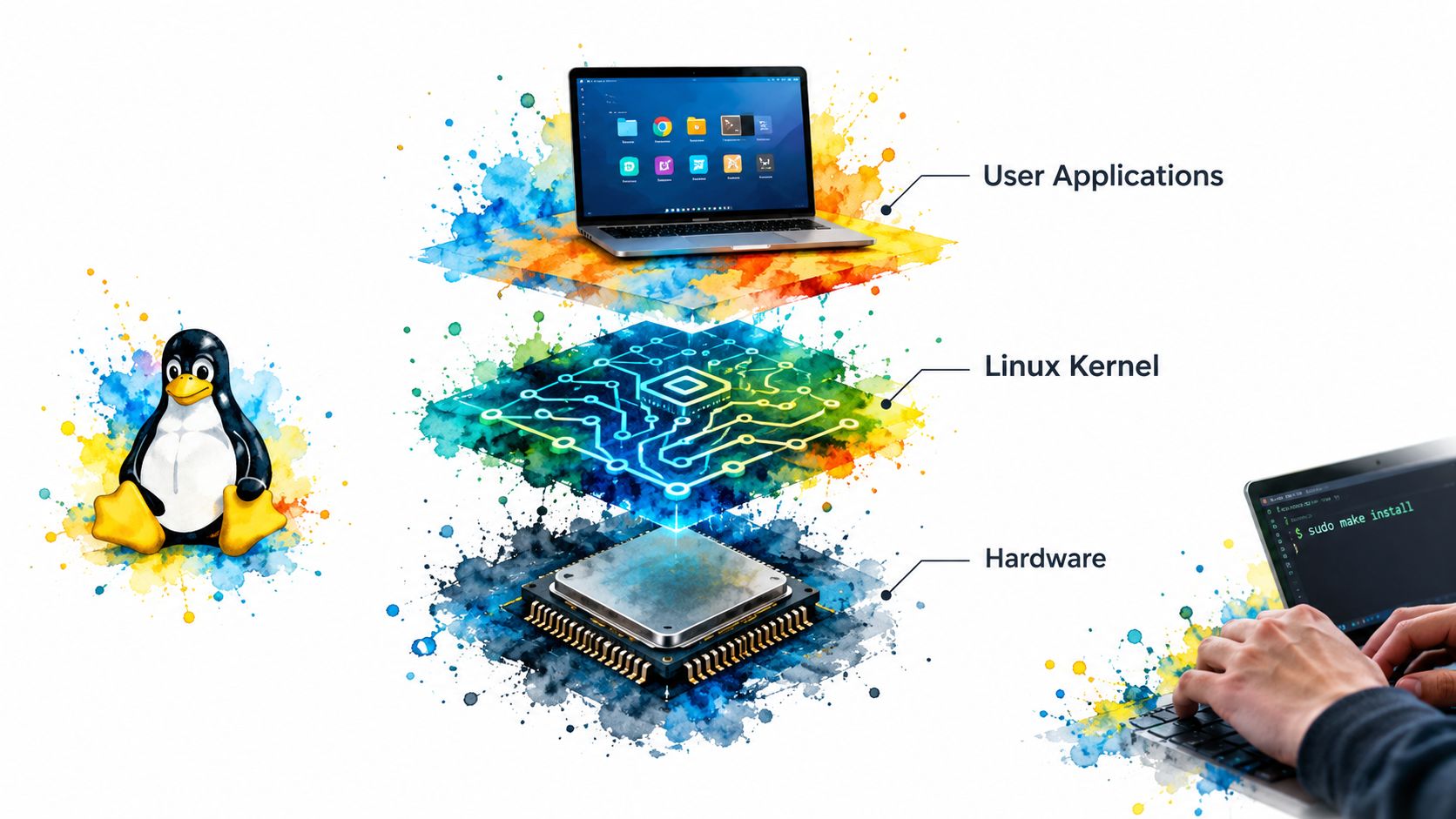
A practical example makes this answer stronger. If a process requests disk I/O, the kernel may move it from a running state to a waiting state until the I/O completes. If a program touches memory that isn't currently mapped, the kernel handles the page fault and resolves it before execution continues.
How to explain it under pressure
Say it in layers. Hardware at the bottom. Kernel in the middle. Applications in user space on top. Then anchor it with one command, such as uname -r, which shows the running kernel release.
There's also a versioning angle that interviewers like. The Linux 2.6 kernel line was originally released on 17 December 2003, and long-lived releases such as 2.6.32 stayed supported until March 2016, while 2.6.33 remained supported until November 2011, according to Linux kernel version history. That history matters because it explains why interviewers ask whether you know the difference between a kernel version and a distribution version.
Practical rule: If you say “Linux version,” be ready to clarify whether you mean the kernel (
uname -r) or the distribution (cat /etc/os-release).
A concise interview-ready structure:
- Definition: “The kernel is the core system component that manages hardware and system resources.”
- Example: “If a process blocks on disk I/O, the kernel schedules something else.”
- Trade-off: “Kernel scheduling and context switching make multitasking possible, but they also add overhead.”
- Verification: “I'd check
uname -rfor the kernel and/etc/os-releasefor the distro.”
If you want more software-engineering interview prompts beyond Linux basics, this set of software engineer interview questions is useful for mixed technical prep.
2. Explain Process Management, Processes vs. Threads and Process States
A process is a running program with its own memory space. A thread is a unit of execution inside a process. Threads share the same process memory, which makes communication easier but also increases the risk of race conditions and shared-state bugs.
A clean Linux example is sleep 1000 &. That command starts a process in the background. You can inspect it with ps -ef | grep sleep or ps aux | grep sleep, then explain how the shell launched it and returned control to you.
A scenario interviewers often use
Suppose the interviewer asks, “What's a zombie process?” A good answer is that it's a child process that has exited, but its parent hasn't collected its exit status yet. The process is done, but it still has a process-table entry. That shows you understand lifecycle, not just commands.
You can also mention process states at a high level: running, sleeping, stopped, and zombie. Keep it simple unless they ask for deeper scheduler details.
- Command:
ps -ef,top, orhtop - Concrete scenario: “I start a background job and want to verify whether it's still running or stuck.”
- Trade-off: “Processes offer stronger isolation. Threads are lighter, but bugs in one thread can affect the whole process.”
A strong answer connects the process model to debugging. If a service is “up” but unresponsive, you don't just list PIDs. You ask whether the process is blocked, spinning, waiting on I/O, or repeatedly crashing.
Interviewers also like to hear the fork and exec pattern in plain language. A shell often creates a new process, then replaces that process image with the requested program. You don't need to turn that into a textbook lecture. One clear sentence is enough.
Load also matters when discussing processes. If an interviewer asks why a machine feels slow, process scheduling and run queues are part of the answer. This practical load average guide is useful context for understanding what you're seeing in uptime or top.
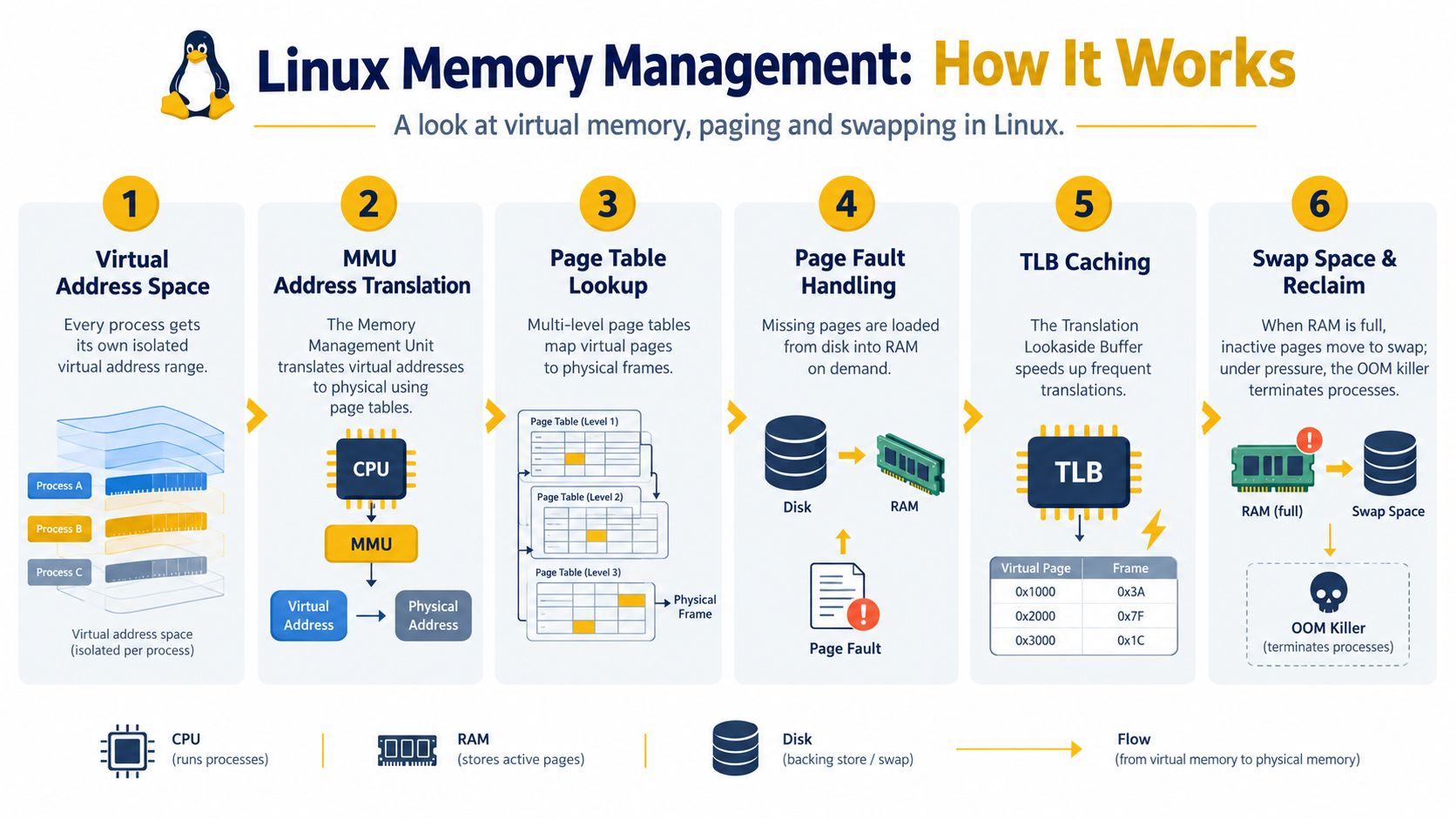
3. How Does Linux Memory Management Work, Virtual Memory, Paging, and Swapping
Linux uses virtual memory, which means each process sees its own address space rather than direct physical RAM addresses. The kernel maps virtual addresses to physical memory and handles page faults when needed. That abstraction gives isolation and flexibility, but memory pressure can still hurt performance.
A candidate often gets tripped up here by saying “100% memory usage means the system is out of memory.” That's too simplistic. Linux uses memory for useful caching, so high memory use doesn't automatically mean trouble. Trouble starts when reclaim becomes expensive, swap activity rises, or processes are killed.
To ground the concept, use commands:
free -hto read memory and swap usagevmstatto spot paging and runnable processestopto identify heavy memory consumers
A realistic scenario is a server that becomes sluggish after a deployment. You run free -h, notice swap use, then run vmstat to see whether the system is actively paging. That's a much better answer than “I'd reboot the server.”
Here's a visual way to remember the flow.
How to phrase the answer
Say: “Linux gives processes virtual memory, maps it to physical RAM, and can move less-active pages to swap. Swap helps avoid immediate failure, but heavy swapping usually means poor performance.”
Then add one operational note. If memory pressure is severe, the kernel may terminate a process with the OOM killer. Even if you don't go deep into scoring details, mentioning that outcome shows real-world awareness.
For systems-level roles, it's also fair to connect memory and kernel evolution to performance. Phoronix reported that Linux 6.17 delivered a 37% improvement on AMD EPYC compared with Linux 5.15 LTS across a four-year span in this kernel performance review. In interviews, that supports a balanced answer about why teams sometimes choose newer kernels for throughput and LTS kernels for stability.
4. What Is the Linux File System Hierarchy, Explain Key Directories and Their Purpose
If a service fails, where do you look? Usually configuration in /etc, logs in /var/log, binaries in places like /usr/bin, and temporary or runtime artifacts in paths such as /tmp or /run, depending on the system.
That answer is more believable than reciting a directory list.
A directory map you can explain simply
Use man hier if it's available on the system. It's a straightforward way to confirm the hierarchy during hands-on work and shows that you know how to verify details instead of bluffing.
A practical incident example:
- Service won't start
- Check config in
/etc - Check logs in
/var/logor withjournalctl - Check process details under
/proc/<PID>/ - Check installed binary path with
whichortype
/proc is worth a sentence because it often impresses interviewers when used correctly. It's a virtual file system that exposes kernel and process information. For example, /proc/<PID>/status can tell you useful details about a running process without special tooling.
Don't answer this question like a trivia quiz. Tie directories to real work: config, logs, binaries, process metadata, and user home files.
A concise response:
- Definition: “Linux follows a structured file hierarchy so system files, configs, logs, binaries, and user data live in predictable places.”
- Example: “If Nginx fails, I'd check
/etcfor config and/var/logor the journal for errors.” - Trade-off: “The hierarchy is consistent, but exact file locations still vary somewhat by distribution and packaging.”
- Verification: “I'd inspect the path directly and use
man hier,ls, andcat.”
5. Explain File Permissions and Ownership in Linux, chmod, chown, umask
Permissions questions often start basic and then turn into troubleshooting. You might hear, “What does 755 mean?” or “Why can't a user modify a file they own?” Good answers handle both.
Start with the model. Linux permissions apply to user, group, and others. Read is r, write is w, execute is x. In octal notation, 755 means rwxr-xr-x, while 644 means rw-r--r--.
Make it concrete with one file and one directory
For a file:
chmod 644 app.confchown alice:dev app.conf
For a directory, explain that execute means traversal. A user may need execute permission on the directory to access entries inside it, even if the file permissions themselves look fine.
A good scenario is /tmp. That directory is writable by many users, but the sticky bit prevents users from deleting each other's files. Mentioning sticky bit shows that you've gone beyond the most basic permission model.
- Command:
ls -l,chmod,chown,stat,umask - Scenario: “A deploy script writes logs as root, then the app user can't rotate or edit them.”
- Trade-off: “Broad permissions can unblock work quickly, but they also weaken security and make accidental changes easier.”
If they ask about defaults, umask is your bridge. It influences the permissions new files and directories receive. You don't need to turn that into arithmetic unless asked.
A concise answer might sound like this: “I'd first inspect ownership and mode with ls -l or stat, then check whether the issue is the file, the parent directory, or default creation settings such as umask.”
For more support-style permission scenarios, this set of IT help desk interview questions is relevant because access problems often show up there too.
6. What Are Linux Signals and How Does Signal Handling Work?
Signals are asynchronous notifications sent to a process. Some ask the process to stop, some interrupt it, and some let it reload or react. The interviewer usually wants to know whether you understand graceful shutdown versus forced termination.
The classic distinction is SIGTERM versus SIGKILL. SIGTERM gives a process a chance to clean up. SIGKILL ends it immediately and can't be caught or ignored. That's why kill -9 should be a last resort, not your default move.
A practical explanation
Pressing Ctrl+C in a terminal usually sends SIGINT to the foreground process. A service manager or orchestration platform might send SIGTERM so the process can close files, finish in-flight work, or flush buffers before exiting.
Use kill -l to show available signals. Use kill <pid> to send the default termination signal. If asked how a parent notices child termination, mention SIGCHLD and keep moving unless they want more detail.
When you say “I'd kill the process,” interviewers often listen for whether you mean a graceful stop or a forced stop.
A strong answer follows this structure:
- Definition: “Signals are kernel-delivered notifications to processes.”
- Example: “
Ctrl+CsendsSIGINT, whilekillusually sendsSIGTERM.” - Trade-off: “Graceful signals allow cleanup. Forced ones are faster but risk corrupted state or incomplete writes.”
- Verification: “I'd inspect the PID, send the least destructive signal first, and confirm exit or behavior change with
psor logs.”
7. Explain Input Output Redirection and Pipes in Linux, >, >>, <, |, 2>, &>
This is one of the most practical Linux interview topics because it shows whether you work comfortably in the shell. The key idea is simple. Standard input is file descriptor 0, standard output is 1, and standard error is 2.
From there, use examples instead of theory-first explanation.
Commands that prove you know it
- Overwrite stdout:
command > output.txt - Append stdout:
command >> output.txt - Redirect stderr:
command 2> error.txt - Merge stdout and stderr:
command > all.log 2>&1 - Pipe into another command:
cat app.log | grep ERROR | wc -l - Read input from a file:
sort < unsorted.txt > sorted.txt
The ordering of 2>&1 matters. That's a common follow-up. command > file 2>&1 sends both streams to the file because stderr is redirected to wherever stdout is pointing at that moment.
A realistic scenario is capturing service startup output during debugging. If you only redirect stdout, you may miss the actual error because many programs write diagnostics to stderr.
- Concept: Separate normal output from errors
- Trade-off: Pipes are efficient for streaming and composition, but long one-liners can become hard to read or maintain
- Verification: Inspect the output files, count lines, or deliberately trigger an error to confirm stderr is captured
If the interviewer asks for a polished shell answer, you can say: “I use pipes when I want one command's output to become another command's input, and redirection when I want to save or separate streams.”
8. What Is a Service or Daemon and How Does systemd Work in Modern Linux?
A daemon is a background process that provides a service, such as SSH, logging, or a web server. On many modern Linux systems, systemd is the init system and service manager that starts, stops, and supervises those daemons.
A useful short distinction is this. systemctl start starts a service now. systemctl enable configures it to start at boot. Candidates often blur those together.
A real service failure answer
If a service won't start, begin with:
systemctl status myservicejournalctl -u myservice- Inspect the unit file if needed
That sequence shows method. You're checking state, then logs, then configuration. It's much better than guessing that “maybe the port is busy.”
A simple unit file explanation can help if the interviewer wants more depth. Mention sections like [Unit], [Service], and [Install], then explain that directives such as ExecStart define what runs and options like Restart= control recovery behavior.
The interview gap here is important. Public Linux prep content still leans heavily on command recall such as chmod, grep, ps, top, df, and systemctl, while under-explaining production troubleshooting under pressure, as described in this Linux interview question guide. That's why a better answer includes both the command and your reasoning path.
“I'd check
systemctl status, then the journal, then the config and dependencies” sounds like someone who has debugged a service before.
9. Explain Linux Networking Basics, IP Addressing, Network Interfaces, and Basic Networking Commands
When networking questions show up, keep your first answer layered. Interface, address, route, then reachability. That structure helps you stay calm when the interviewer turns a basic question into a troubleshooting one.
The most useful commands are:
ip addrfor interface addressesip routefor routingpingfor basic reachabilityss -ltnporss -tulpnfor sockets and listening ports
A step by step connectivity scenario
Suppose a service is reachable locally but not from another machine. Start by checking whether it's listening on the expected interface and port with ss. Then verify the host address with ip addr. Then confirm the route with ip route. If the service binds only to 127.0.0.1, remote clients won't reach it.
That answer shows you understand the difference between the application layer and the network layer.
Linux also matters here because usage differs by environment. One market-oriented source reports Linux at 7.53% globally on desktop and 10.65% in the United States, while Steam's July 2026 survey measured Linux at 4.01% of gaming PCs in this Linux adoption snapshot. In interviews, that supports a nuanced point: Linux appears modest on consumer desktops, but it remains highly relevant for servers, infrastructure, and specialized workloads.
For networking and security-adjacent follow-ups, these cybersecurity interview questions are a useful complement because many port, service, and access-control questions cross both domains.
10. What Are Linux Containers and How Do They Differ from Virtual Machines?
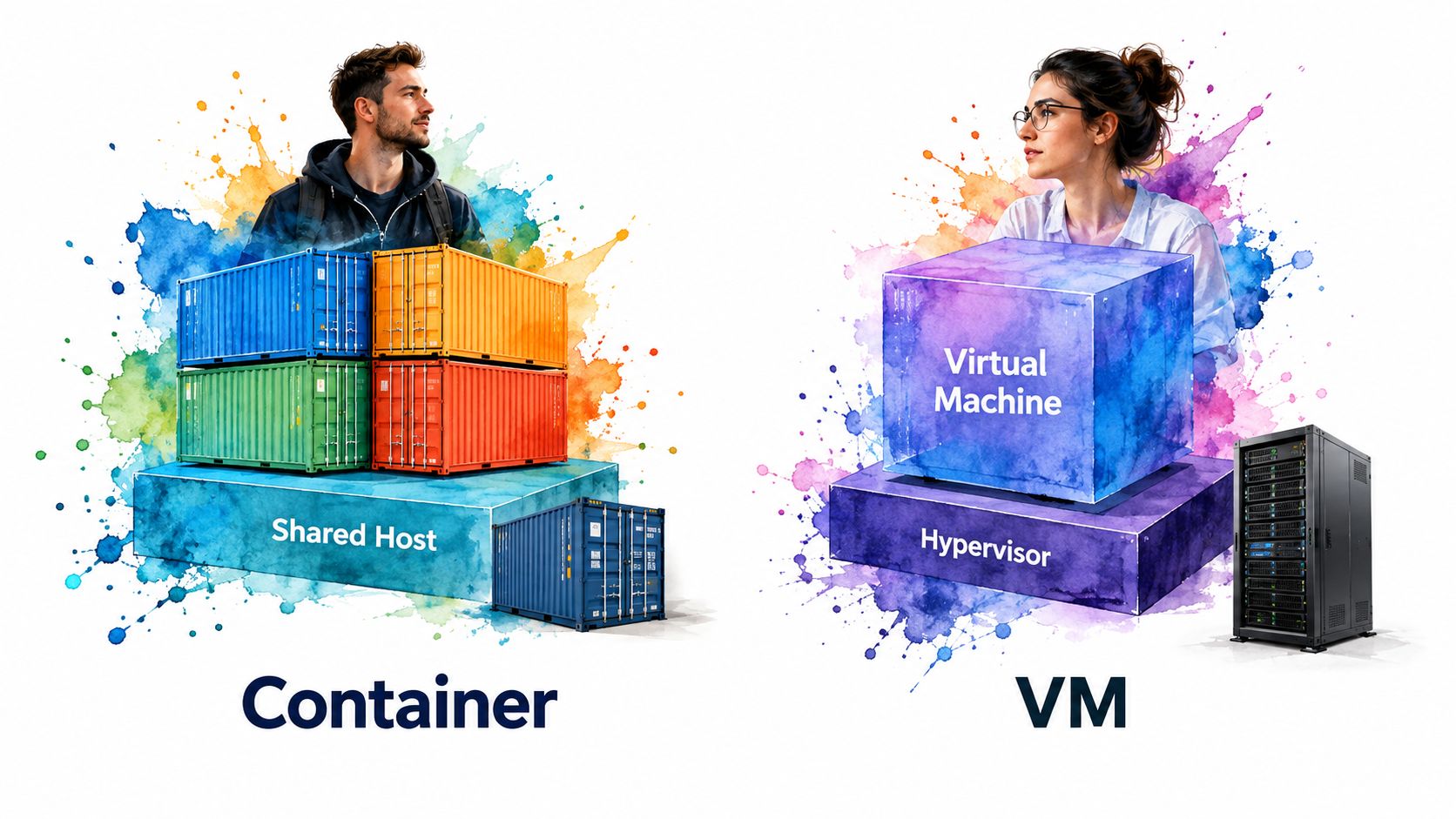
A clean answer starts with isolation. Containers share the host kernel but isolate processes and resources. Virtual machines emulate or virtualize a full machine environment and typically run their own guest operating systems.
That's the core difference. Containers are usually lighter to start and package. VMs provide stronger separation at the OS boundary.
The Linux pieces interviewers care about
If the conversation gets technical, mention:
- Namespaces for isolation of process views and related resources
- cgroups for resource limits
- Minimal images that may not include the familiar debugging tools you expect on a full server
A concrete example helps. docker run starts a containerized process that may see only its own process namespace, even though it shares the host kernel. That's why ps inside a container can show a very different process view from ps on the host.
The modern interview gap here is real. Many public guides still focus on basic Linux trivia, while cloud-focused roles now ask how permissions, namespaces, cgroups, systemd, and logging behave in containers and Kubernetes nodes, as discussed in this Linux interview prep article for modern infrastructure roles. A strong answer connects classic Linux knowledge to container realities.
A concise structure:
- Definition: “Containers isolate processes while sharing the host kernel. VMs run separate guest operating systems.”
- Example: “I can inspect a container with Docker commands, but the Linux concepts underneath are still processes, namespaces, and cgroups.”
- Trade-off: “Containers are efficient and portable, but debugging can be harder because images are minimal and process visibility is scoped.”
- Verification: “I'd check running containers with
docker ps, then inspect the process, port, and logs from both container and host perspectives.”
Comparison of 10 Linux Interview Topics
| Topic | Complexity 🔄 | Resource Requirements ⚡ | Expected Outcomes 📊 | Ideal Use Cases ⭐ | Key Advantages 💡 |
|---|---|---|---|---|---|
| What is the Linux Kernel and How Does It Work? | 🔄 High, deep OS & hardware interaction | ⚡ High for kernel development/testing; moderate for conceptual study | 📊 Strong system-level understanding; ability to explain scheduling, drivers, memory management | ⭐ Kernel development, embedded systems, advanced SRE/DevOps | 💡 Demonstrates core architecture knowledge and low-level troubleshooting ability |
| Explain Process Management: Processes vs. Threads and Process States | 🔄 Moderate, conceptual + practical state transitions | ⚡ Low–Moderate (commands and demos) | 📊 Clear grasp of concurrency, scheduling, and process lifecycle | ⭐ Multithreaded app dev, performance troubleshooting, SRE tasks | 💡 Useful for explaining context switch costs and process-vs-thread trade-offs |
| How Does Linux Memory Management Work? Virtual Memory, Paging, and Swapping | 🔄 High, involves hardware/software interactions | ⚡ High (requires tools and practical measurement) | 📊 Ability to diagnose OOM, paging costs, and optimize memory pressure | ⭐ Performance-sensitive apps, system tuning, capacity planning | 💡 Explains virtual-to-physical translation and swap-related performance impacts |
| What is the Linux File System Hierarchy? Explain Key Directories and Their Purpose | 🔄 Low–Moderate, mostly factual structure | ⚡ Low (knowledge + quick shell checks) | 📊 Practical system navigation and config management skills | ⭐ System administration, troubleshooting, onboarding to Linux systems | 💡 Foundational for locating configs, logs, and understanding permissions |
| Explain File Permissions and Ownership in Linux (chmod, chown, umask) | 🔄 Low, straightforward model with octal/symbolic nuances | ⚡ Low (commands and examples) | 📊 Competence in file security and access control | ⭐ Sysadmin, security audits, application deployment | 💡 Direct impact on security; easy to validate with examples |
| What are Linux Signals and How Does Signal Handling Work? | 🔄 Moderate, asynchronous behavior and safety concerns | ⚡ Low–Moderate (code examples and testing) | 📊 Ability to build graceful shutdowns and safe handlers | ⭐ Daemon development, robust application lifecycle management | 💡 Essential for IPC and handling termination/race conditions correctly |
| Explain Input/Output Redirection and Pipes in Linux (>, >>, <, |, 2>, &>) | 🔄 Low, practical shell mechanics | ⚡ Low (command-line practice) | 📊 Immediate productivity gains in scripting and data processing | ⭐ Shell scripting, log processing, one-liners for troubleshooting | 💡 Enables powerful command composition and efficient streaming workflows |
| What is a Service/Daemon and How Does systemd Work in Modern Linux? | 🔄 Moderate–High, many unit types and directives | ⚡ Moderate (unit files, logs, testing) | 📊 Competence in service lifecycle, dependencies, and logging | ⭐ Service deployment, production system administration, DevOps | 💡 Unified management, socket activation, and rich restart policies |
| Explain Linux Networking Basics: IP Addressing, Network Interfaces, and Basic Networking Commands | 🔄 Moderate, broad topic with practical steps | ⚡ Moderate (lab/network tools for practice) | 📊 Ability to diagnose connectivity, routing, and DNS issues | ⭐ DevOps, cloud networking, container networking, troubleshooting | 💡 Foundation for infrastructure work and container/K8s networking |
| What are Linux Containers and How Do They Differ from Virtual Machines? | 🔄 Moderate, conceptual isolation + ecosystem details | ⚡ Variable (low to high depending on hands-on depth) | 📊 Understanding of isolation, resource limits, and deployment trade-offs | ⭐ Cloud-native apps, CI/CD, microservices, orchestration (Kubernetes) | 💡 Lightweight portability and faster startup vs VM isolation and full OS separation |
Turn Linux Knowledge Into Interview-Ready Answers
The difference between a shaky Linux answer and a strong one usually isn't more trivia. It's structure. When you practice, keep each response in a repeatable format: define the concept, give one concrete example, mention one trade-off or common mistake, and finish with the command you'd use to verify it.
That works especially well for the first half of this list. Rehearse the kernel, process, memory, file system, permissions, and signals questions as short explanations you can deliver in under a minute. Use commands such as ps, free, vmstat, kill, and stat so your answer sounds grounded in real system behavior instead of sounding memorized.
Then spend most of your time on scenario practice. Linux interview content often overemphasizes command recall and underemphasizes incident reasoning, even though interviewers increasingly care about troubleshooting judgment in cloud and operations roles. Practice the service and networking topics by talking through symptoms, evidence, and next steps with commands like systemctl, journalctl, ip, and ss.
A good rehearsal pattern is to record yourself answering three kinds of prompts:
- A concept prompt such as “What is the kernel?”
- A comparison prompt such as “Processes vs. threads”
- A debugging prompt such as “The service won't start” or “The box is slow”
When you replay your answer, check for four things. Did you define the concept clearly? Did you give a real example? Did you mention a trade-off or pitfall? Did you name a command that would verify your claim? If one of those is missing, the answer usually sounds incomplete.
You should also practice saying “I'd verify that” out loud. Interviewers often trust candidates more when they hear operational humility. Linux work rewards careful checking. So do Linux interviews.
If you want more structured reps, tools that support mock interviews and searchable question banks can help you keep the conversation flowing instead of freezing on follow-ups. Interview Pilot is one option that can be relevant here because it offers AI mock interview practice, a question bank, and live interview assistance features. For a broader prep routine around technical hiring, this guide to technical interview preparation for LATAM is also useful.
The goal isn't to memorize ten perfect scripts. It's to become the candidate who can explain Linux clearly, support the explanation with commands, and troubleshoot without losing the thread. That's what most interviewers are looking for when they ask an interview question on Linux.
If you want to practice these Linux topics in a more realistic way, Interview Pilot offers AI mock interviews, a searchable question bank, and real-time answer support during live online interviews. It's a practical way to rehearse kernel, process, service, and troubleshooting follow-ups until your answers sound clear, structured, and natural.
Topics
interview question on linux
Linux interview questions
Linux commands
Linux troubleshooting
DevOps interviews
Continue reading

Interviews
10 Interview Questions DevOps Candidates Should Know
Prepare for interview questions DevOps candidates face, with example answers and exercises on CI/CD, IaC, reliability, monitoring, culture, and troubleshooting.
September 20, 2026
37 min read
Interviews
Multithreading Programming C: A Practical Guide
Learn multithreading programming c with pthreads, C11 threads, mutexes, memory orders, and the races that make extra threads slower.
November 2, 2026
18 min read

Interviews
Phone Interview Preparation Checklist for 2026
Phone interview preparation checklist with room and line setup, timed STAR stories, and scripts for a 15–30 minute screen.
November 2, 2026
19 min read